Skip to content

01 School and madrasa office

Admissions, attendance, fees, and results in one office.

Maslaki is the daily workspace for schools, madrasas, and academies. Staff, teachers, parents, and students sign in once. Each institution keeps its own records.

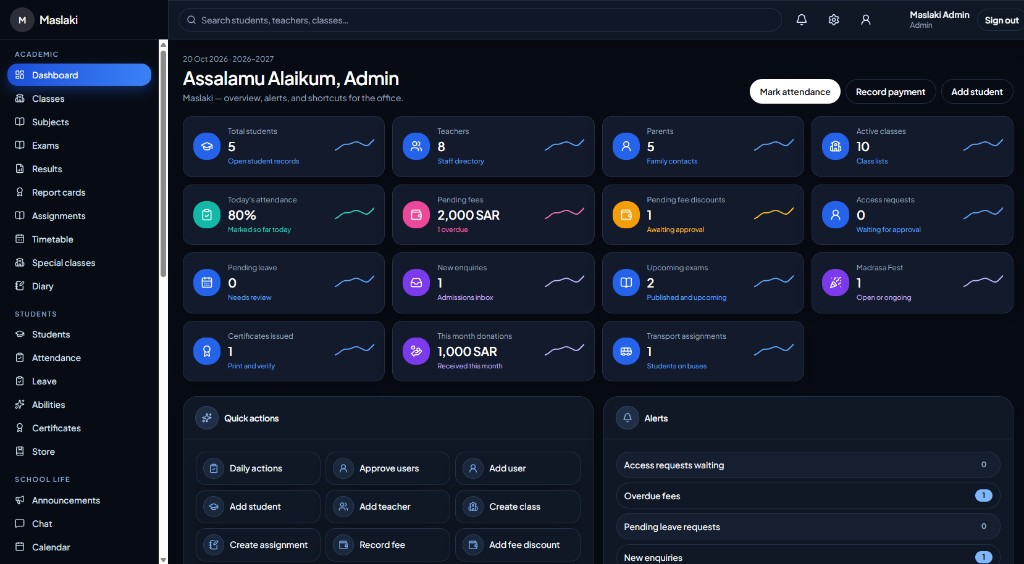
The office dashboard
Office

Attendance

A clearer attendance register.

Mark the class for the day, keep the history, and give the office one register instead of a paper book.

  • Present, absent, late, and excused
  • A register for each class and day
  • Attendance history the office can review
  • Families can follow the record from their account
Attendance
The attendance register, with present, absent, late, and excused

Parent communication

Family updates in one place.

Post notices for parents, a class, or the whole school, instead of calls, paper notes, and scattered messages.

  • Announcements for the right audience
  • Parents see the notices meant for them
  • A dated record the office can review
  • One screen instead of loose notes
Announcements
Announcements for parents, classes, and the whole school

How it works

The school day, kept in one record

From the morning register to the family update, the office uses the modules you already run. A second system is not required.

Step 01

One sign-in

People do not choose a portal. The account opens the right dashboard.

  • ✓Admin, teacher, parent, and student
  • ✓One sign-in form
  • ✓The role comes from the account

Step 02

The school day

Attendance, fees, exams, and family messages stay with the student record.

  • ✓Attendance, leave, and timetable
  • ✓Fees, receipts, and discounts
  • ✓Exams, results, and certificates

Step 03

Their own institution

Each school gets its own copy, its own database, and its own public homepage.

  • ✓Name, logo, and colours in Settings
  • ✓No shared database
  • ✓Hand the first admin their login

Included

What the office covers

  • 01

    Students

    Enrolment, profiles, guardians, and class placement.

  • 02

    Parents

    Guardian records linked to their own children.

  • 03

    Classes and staff

    Several teachers on one class, one teacher across grades.

  • 04

    Attendance

    Present, late, absent, and excused, with history.

  • 05

    Timetable

    The week on one grid. Teachers see the classes they teach.

  • 06

    Announcements

    Everyone, a role, or a single class.

  • 07

    Fees and receipts

    Partial payments, overdue balances, and a printable receipt.

  • 08

    Exams and results

    Marks stay in the office until you publish them.

  • 09

    Reports and settings

    Filter by date or class, then export. Subjects and fee types live in Settings.

1

Sign-in for every role

4

Dashboards

Own

Database for each school

A paper office, and Maslaki

MaslakiPaper office
Sign-inOne form. The account opens the right dashboard.Separate books for office, class, and home.
RecordsStudents, families, staff, classes, and attendance in one office.Paper registers and loose spreadsheets.
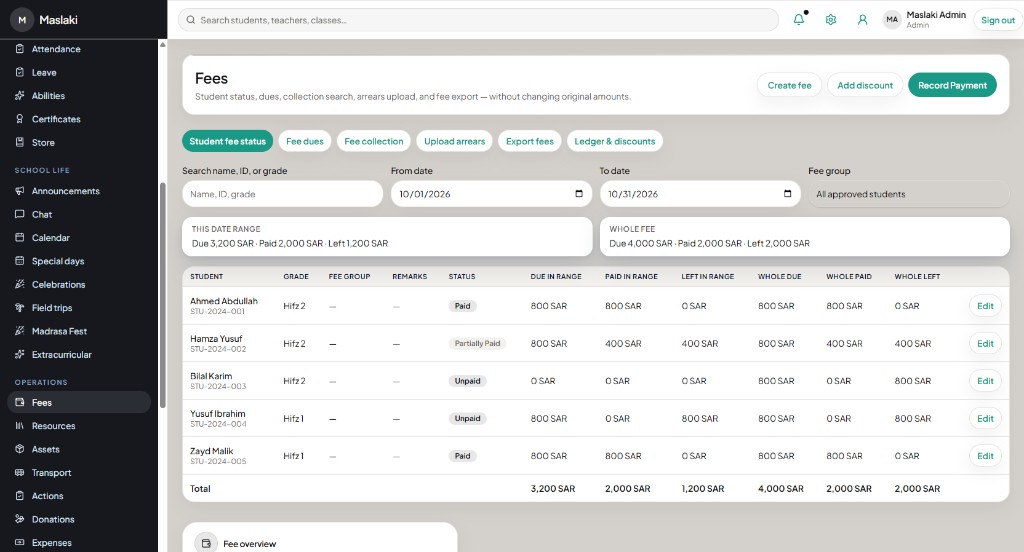
MoneyFees, discounts, receipts, and donations in the fee screens.A cash book kept by hand.
ResultsExams, marks, and report cards from the same student record.Mark sheets copied out at term end.
DatabaseEach school has its own database. Nothing is shared.One file passed between people.

Who it is for

Schools and madrasas that want one office

For

Schools

Day schools that need roll, fees, and results in the same record.

For

Madrasas

Qur'an and hifz classes, with family updates beside the class list.

For

Academies

After-school centres with their own teachers, classes, and payments.

For

Learning centres

Small teams that still want attendance, fees, and parent access.